You open Cursor in the morning, and one of your extensions updated itself overnight. Like everyone else, you don't give it a second thought.
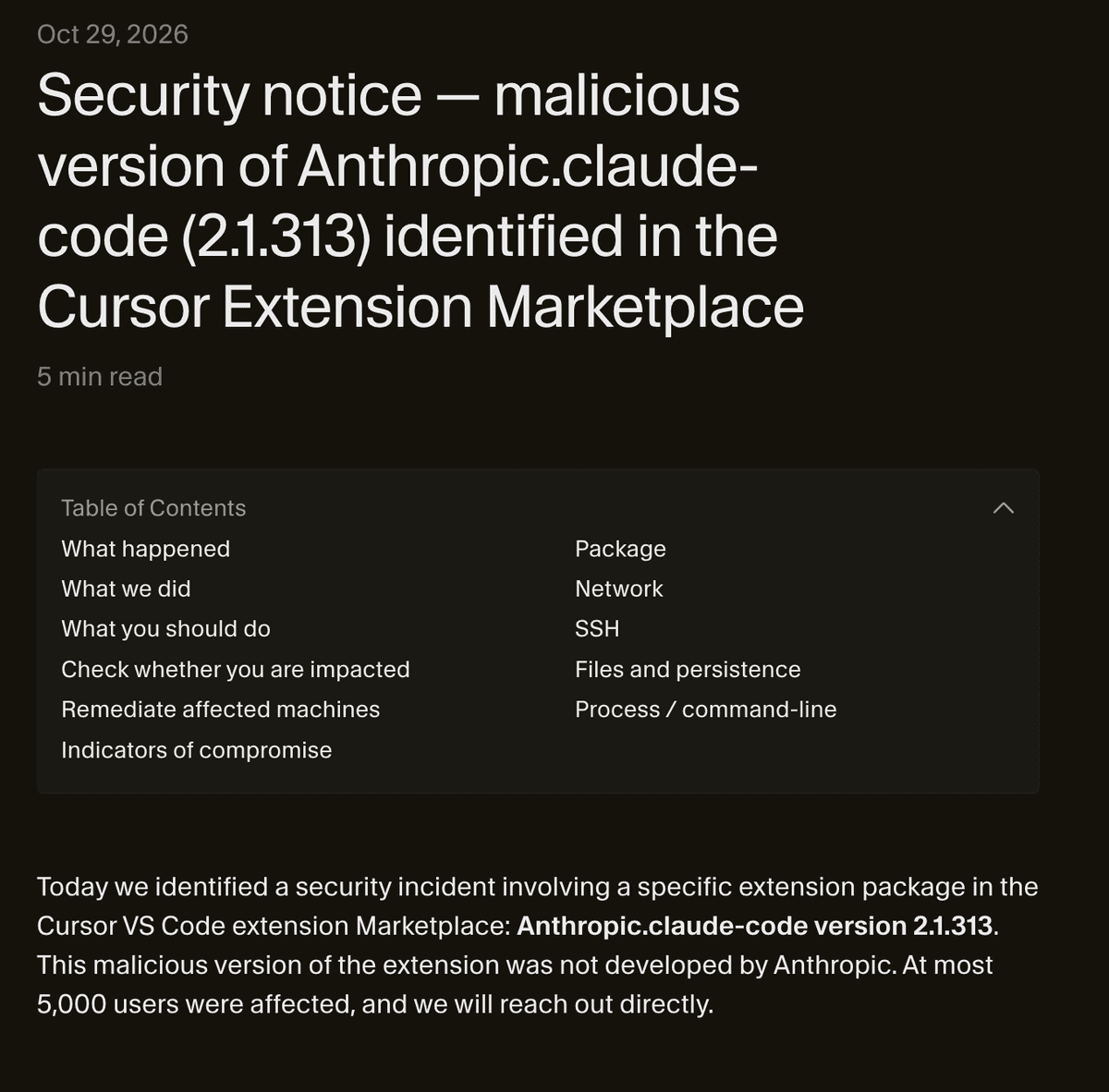
On 29 October 2026, that habit could have cost you. For eleven hours, Cursor's extension marketplace served a rigged version of the Claude Code extension, numbered 2.1.313. It was not written by Anthropic.
According to Cursor, no more than 5,000 users received it. If you don't use Cursor, you're not affected.
Let's look at what happened, how to check your machine with a single command, and what to do if it was hit. You don't need to be a developer to follow along, it's all copy and paste.
What happened on 29 October?
Cursor is a code editor built on VS Code. Like VS Code, it has its own extension marketplace, where you pick up add-ons for the editor. The Claude Code extension is one of them. It opens Anthropic's AI agent in a Cursor panel.
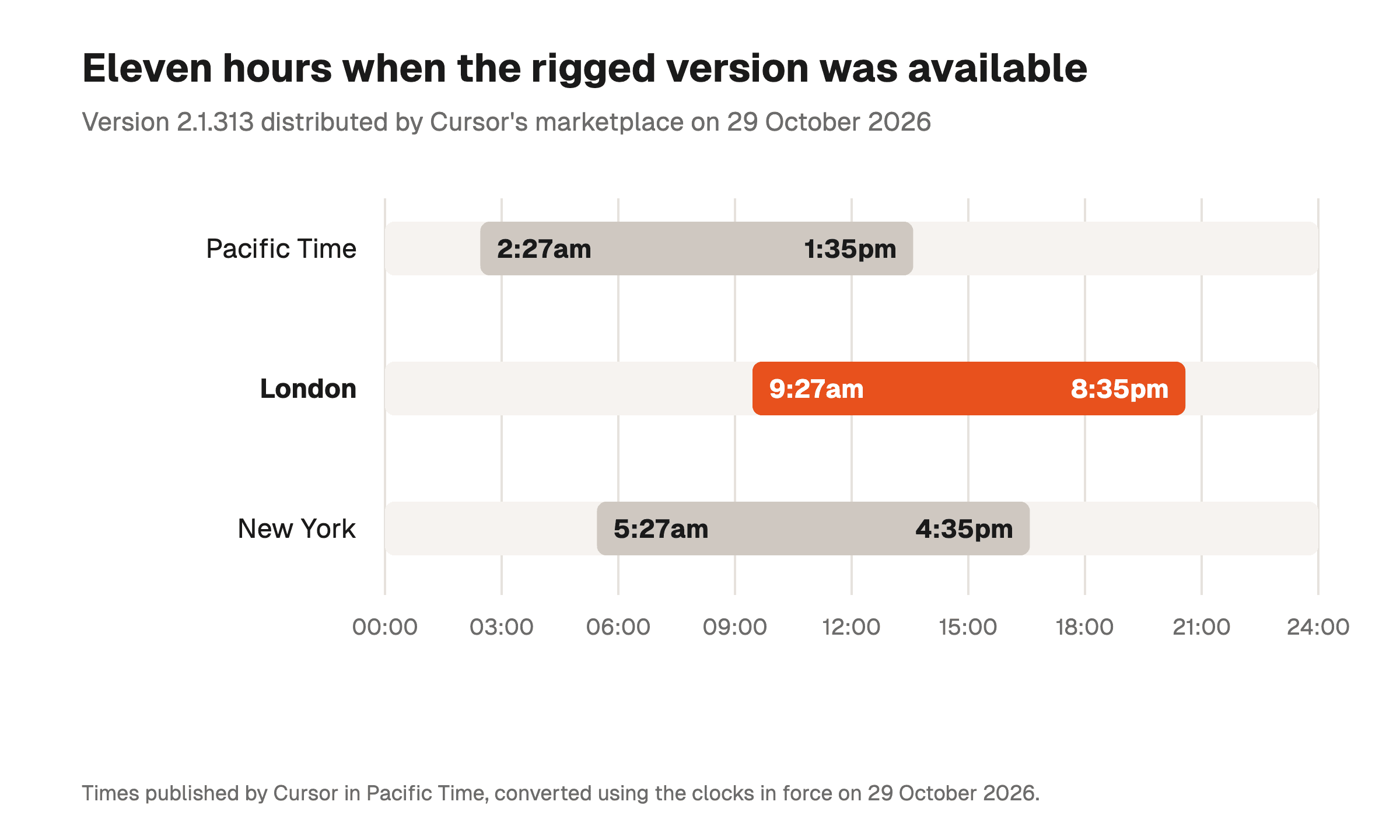
Between 2:27am and 1:35pm Pacific Time, that marketplace offered a modified version 2.1.313. According to Cursor's security notice, this package was not developed by Anthropic.
Cursor pulled it as soon as it was spotted, then shut the whole marketplace down as a precaution. The company rotated its own keys and rebuilt the marketplace. It says it checked that no other extension had been tampered with.
Cursor gives its times in Pacific Time. That day, the UK was already on winter time while North America was not. In London the window ran from 9:27am to 8:35pm, and from 5:27am to 4:35pm in New York.
Claude Code installed any other way is not part of this. Cursor writes that nothing points to a problem with other versions of the extension, or with Anthropic's official distribution.
How do you know if you're affected?
To be exposed, three things must all be true:
- You use Cursor, not VS Code or another editor;
- The Claude Code extension is installed in it;
- It moved to version 2.1.313 during the 29 October window.
Start with the version number. On a Mac or on Linux, this command lists the versions of the extension installed on your disk, without opening Cursor.
ls ~/.cursor/extensions | grep claude-codeA line containing 2.1.313 means the rigged version reached your machine. On mine, the command came back with 2.1.69, and I breathed out.
But a different number doesn't prove anything on its own. A later update may have deleted the old folder. The real proof is the key the attacker leaves behind.
The rigged extension adds a key called svc-telemetry to the list of keys allowed into your computer. Cursor gives the command to look for it on a Mac.
grep -qs svc-telemetry ~/.ssh/authorized_keys && echo "svc-telemetry key found" || echo "No key found; machine not impacted""No key found" means your Mac is not affected. "svc-telemetry key found" means the opposite, and you need to jump to the steps further down.
On Windows, open PowerShell and paste these two lines.
$files = "$HOME\.ssh\authorized_keys", "C:\ProgramData\ssh\administrators_authorized_keys" | Where-Object { Test-Path $_ }
if ($files -and (Select-String svc-telemetry $files)) { "svc-telemetry key found" } else { "No key found; machine not impacted" }
The answer reads the same as on a Mac. I closed Cursor the moment I read the notice, before running these checks, and they took me less than a minute.
What does this extension do to your computer?
It all revolves around SSH, the usual way to open a terminal on another computer remotely. You get in with a key, just like a flat.
The rigged extension cuts a copy of your keys and slips it under your doormat. Then it tells your computer to ring the attacker every 60 seconds, to hold the door open for them.
According to Cursor, it tries four things:
- Send your details to the attacker: your computer's name and your username, your Git email, your IP address, your working folders and the names of your environment variables;
- Add its key to your authorised SSH keys;
- Turn on the SSH service on your machine and open a reverse tunnel (a connection that goes out from your machine to the attacker, so they can come back in through it);
- Make that tunnel permanent, with a script that restarts at boot and tries again every 60 seconds.
The name of an environment variable is not its value. The extension may have read "STRIPE_SECRET_KEY", not the key itself. Cursor points out, though, that the backdoor could have been used later to read the rest.
The good news is that the door almost never opened. Turning on the SSH service requires admin rights, and the extension doesn't have them on most Macs and Windows PCs. On those machines, the attacker couldn't get in through the tunnel.
The rest worked all the same. Your computer still holds the attacker's key and the script that keeps trying.
Cursor had the attacker's server taken down by its hosting provider, so nothing reaches them any more. Those files stay on your machine, though, until you remove them.
Your machine is affected: what to do, in order?
If the command found the key, follow Cursor's steps in this order:
- Download the clean-up script at the bottom of Cursor's notice, remediate-macos.sh or remediate-windows.ps1;
- Turn off Wi-Fi and unplug the network cable while you clean the machine;
- Run the script, with your usual account on a Mac (not as an administrator), and in a PowerShell window opened as administrator on Windows;
- Check that it finishes without an error, because it reports anything left behind, and in that case Cursor advises considering a full reinstall;
- From another computer, change the passwords, keys and sessions that the affected machine could reach.
Uninstalling the extension is not enough. The script it dropped runs on its own, without it, and keeps restarting the tunnel. Cursor's script removes it along with the key.
When you work alone, the list for step 5 is often longer than you think. Think of the .env files in your projects, your API keys (Stripe, OpenAI, Anthropic) and your GitHub token.
Don't forget access to your clients' servers. For any question about your own case, Cursor answers at security@cursor.com, and is contacting affected users directly.
How do you stop this happening again?
An extension can do anything on your computer that you can do. An automatic update therefore installs code that nobody on your side has read.
Turn off automatic extension updates
Cursor uses VS Code's settings. Open the command palette, type "Open User Settings (JSON)" and add these two lines:
"extensions.autoUpdate": false,
"extensions.autoCheckUpdates": false
The first stops Cursor from installing a new version on its own. The second stops it from even checking whether one exists, as the VS Code documentation explains.
The catch is that security fixes no longer arrive on their own either. Open the Extensions panel once a week, and wait a few days before installing a brand-new version.
Install Claude Code straight from Anthropic
Claude Code also works without the extension, in Cursor's built-in terminal. Anthropic then distributes it itself, with its official installer.
You keep the same Claude Code agent, without going through Cursor's marketplace. And this distribution is not affected by the incident, according to Cursor.
Never run Cursor as an administrator
That's what saved most machines. An editor started as administrator hands those rights to every one of its extensions, and the door then swings wide open.
For the vast majority of you, the check takes one command and answers "No key found". Run it, then turn off automatic updates if you'd like to stay in control 😉
FAQ
How do I know if the rigged Claude Code extension is on my computer?
Look for the svc-telemetry key in your authorised SSH keys. On a Mac, the command grep -qs svc-telemetry ~/.ssh/authorized_keys does it for you. If the key isn't there, your machine is not affected.
On Windows, Cursor gives an equivalent PowerShell command in its security notice of 29 October 2026.
Should I uninstall the Claude Code extension from Cursor?
No, if you never received version 2.1.313. Only that version, served by Cursor's marketplace on 29 October 2026, was rigged.
If you did receive it, uninstalling is not enough. You need to run the clean-up script provided by Cursor, then change your passwords and keys.
Is Claude Code installed in the terminal affected?
According to Cursor, nothing suggests that Anthropic's official distribution is affected. Only the 2.1.313 package of the extension, offered by Cursor's marketplace on 29 October 2026, was rigged.
Were my API keys stolen?
The rigged extension sent the names of your environment variables, not their contents. Change them anyway if the svc-telemetry key is on your machine.
Cursor points out that the backdoor could have been used to read them later.