You open Claude in the morning, your routines ran overnight… and the Routines section has disappeared from the Claude Code sidebar. No more yellow dot when a routine is waiting for your answer, no more way to tell what is still running. To read what a routine did, you now have to click several times.
It happened to me too, with a dozen routines that prepare my morning. Good news: nothing is lost, and the setting that brings them back takes ten seconds. You just need to know where it hides!
Have your routines really disappeared?
No. A routine, or scheduled task in Anthropic's documentation, still starts at its scheduled time. The desktop app just needs to be open and your computer awake. Only the way the sidebar displays them has changed, not your tasks.
Before the update, the sidebar of the Code tab had a section between "Customize" and "Pinned". Every run of a routine showed up there, and one click opened it.
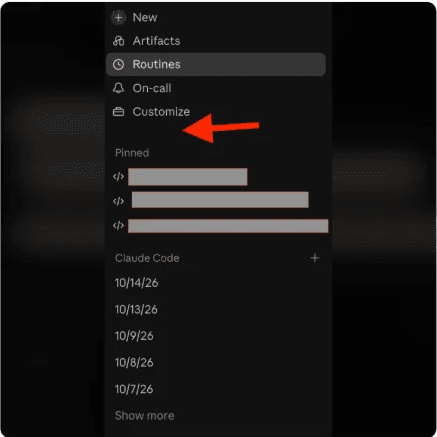
On this screenshot posted on Reddit, the red arrow points to where the section used to be. Your routines are still on the Routines page at the top of the sidebar, but you have to go in, then open each routine to see its runs.
How do you bring routines back to the sidebar?
The setting exists, it is just hidden. The icon that opens it only appears when your mouse hovers over it. A Reddit user found it by accident, in this r/ClaudeAI thread, and that post saved a lot of people's day.
- Hover over the heading of the session list, the one above your sessions sorted by date ("Claude Code" on the screenshot above);
- Click the small settings icon that appears to the right of that heading, next to the "+";
- Open "Show", then tick "Routines".
The runs of your routines come straight back into the list, mixed in with your sessions and sorted by date.
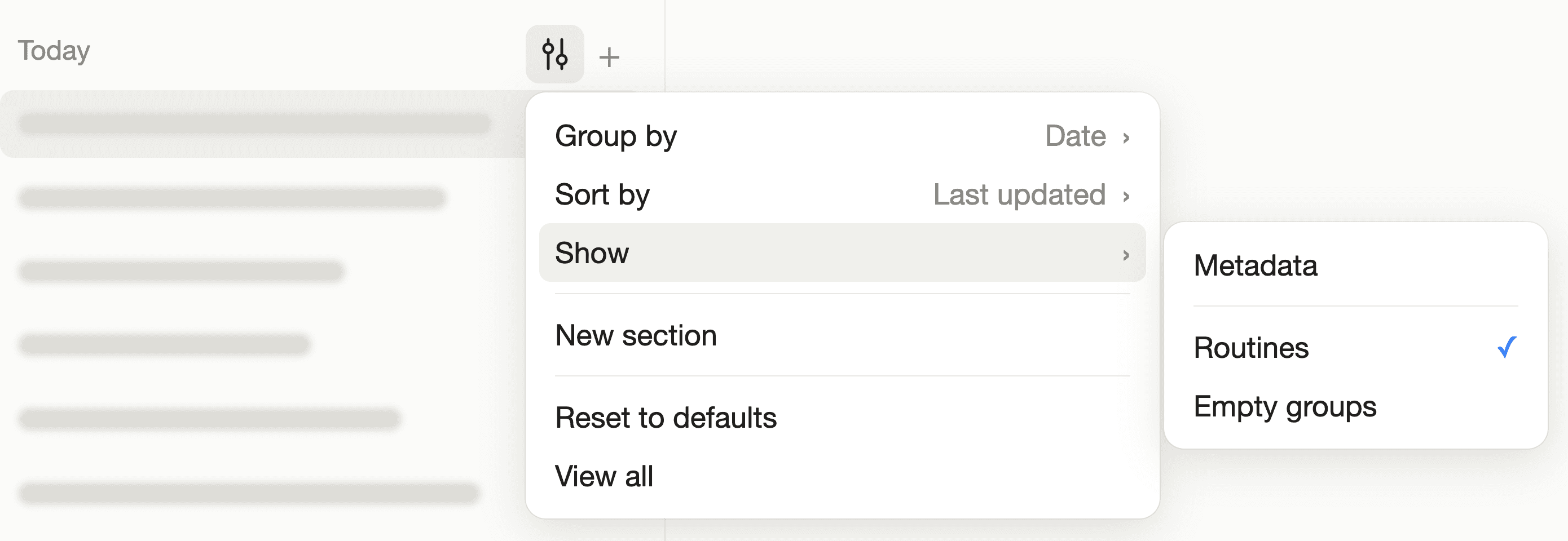
The same menu also sets up the list. "Group by" sorts your sessions by project or by environment, and "Sort by" changes the order (last updated, for example).
Can't see the icon? Keep the mouse still for a second over the heading of the list: it only shows up on hover, and that is where almost everyone misses it.
What if the option still doesn't show up?
Start by updating the desktop app. On Reddit, it was the first answer given to people who couldn't find the menu, because their version was too old. The Claude menu, then "Check for Updates…", tells you in a few seconds.
If the setting is still nowhere to be found, three paths still lead to your routines.
- The Routines page, at the top of the sidebar or in the "More" menu. It lists all your routines, and each routine opens the history of its runs;
- Search, with the scheduled tasks filter. It is the only place where you can find a one-time routine that has already run, because once it has run, it disappears from the Routines page;
- Claude itself. In any session of the Code tab, it can read the list of your routines and their runs.
For that last path, just paste this sentence into a session.
List every routine that has run since midnight, with a link to each run.Claude gives you the list with clickable links. You open the run you care about, without digging through the Routines page.
On GitHub, some users tried to force the section back by editing the app's settings file. It doesn't stick, because the app rewrites the value every time it starts. Leave that file alone, the "Show" menu is enough.
Why did the Routines section disappear?
Anthropic hasn't said anything, and no release note for the app mentions removing the section. Yet reports on GitHub picked up again with version 2.37337.1 of October 13, 2026.
The most likely explanation is a redesign of the sidebar. Routines became an option of the session list, and that option ended up unticked for some users. The issue is still open, and the section may come back as it was in a future version.
In the meantime, "Show", then "Routines", puts everything back in place. And if you want to get more out of Claude Code every day, our Claude Code course walks you through it step by step 😉
Frequently asked questions about Claude Code routines disappearing
Do my routines keep running if they no longer show up?
Yes. Only the sidebar display has changed: your routines still start at their scheduled time.
They only run while the desktop app is open and your computer is awake, just like before the update.
Where is the setting that shows routines again in Claude Code?
Hover over the heading of the session list, click the settings icon that appears, then open "Show" and tick "Routines".
The icon only appears on hover, which is why people miss it.
How do you find a one-time routine that has already run?
Use search, with the scheduled tasks filter. A routine that runs only once disappears from the Routines page after its run.
You can also ask Claude, in a session, for the list of past routines with a link to each one.
Do you need to edit Claude's configuration file to bring the section back?
No. The app rewrites that value every time it starts, so the change doesn't stick.
The "Show" menu of the session list is enough, after updating the app if the option doesn't appear.