A client has just forwarded you an article about a "critical flaw in PHP". Your site runs on WordPress, it works perfectly well, and you have no idea what PHP is or whose job it is to deal with it.
The short answer: the October 2026 PHP vulnerability affects your WordPress site, like almost every site built on that language. The fix happens on the server, with a new version of PHP. No plugin and no WordPress update will change that.
So let's look at what happened and how to tell whether your site is exposed. Then we'll see who installs the fix, and what to do if your PHP version is too old. You don't need to be a developer to follow along.
What happened with PHP in October 2026?
On 20 October 2026, a post on Hacker News revealed two flaws in PHP before their fixes were ready. The post was taken down, but screenshots were already doing the rounds.
A few hours later, the PHP security team confirmed two critical vulnerabilities. It set the release of the fixes for 21 October 2026 at 14:00 UTC.
Each of the two flaws is rated 9.2 out of 10. Sansec, a company that monitors the security of online shops, classes them as remote code execution flaws. Someone with no access to your site at all could make your server run their own commands.
The rating comes from the CVSS scale, version 4.0, which runs from 0 to 10. From 9 upwards, a flaw falls into the "critical" category, the highest on the scale.
Attackers didn't wait for the fix. According to Sansec's analysis, Cloudflare reported the first attempts against PHP sites on 21 October at 07:43 UTC.
Sansec also expects mass attacks within fifteen minutes of the fix being released. A published fix shows anyone who can read it exactly where the flaw is.
PHP released its fixes on 21 October 2026, a little ahead of the announced time. The fixed versions are PHP 8.5.12, 8.4.27, 8.3.36 and 8.2.35. According to PHP's security advisory, the first flaw is triggered when PHP runs out of memory in the middle of a request. The second leaves a request's data lying around, where a later request can reuse it.
Why is your WordPress site affected?
WordPress is written in PHP, a programming language that runs on the server. On every visit, your server starts PHP, which reads the code of WordPress, your theme and your plugins. It then builds the page sent to the visitor.
The flaw isn't in WordPress, it's in PHP itself. Picture a shopping centre. Your site is one of the shops, and PHP is the building.
The flaw is in the shopping centre's main entrance. Changing the lock on your shop doesn't stop anyone walking into the hall.
That's why no security plugin protects your site against these two flaws. For Sansec, the fix happens on the server, not in the site's code.
According to the security firms that studied the leak, the following are affected:
- WordPress sites, WooCommerce shops included;
- sites built with another PHP-based tool, such as Drupal, Joomla, PrestaShop or Magento;
- custom PHP applications, for example a site built with Symfony or Laravel.
Is your site built with Wix, Shopify or Webflow? You have no server to manage. Protecting it is the platform's job, and there's nothing for you to do.
WordPress maintenance mode won't keep you safe. According to Sansec, PHP reads every request before WordPress even checks whether the site is in maintenance. To take a site out of reach, you have to shut it down at server level.
How do you find out which PHP version your site uses?
The version matters, because it decides whether your site will get a fix. Only PHP versions 8.2 to 8.5 are still maintained by the PHP team, and security fixes normally go to them alone.
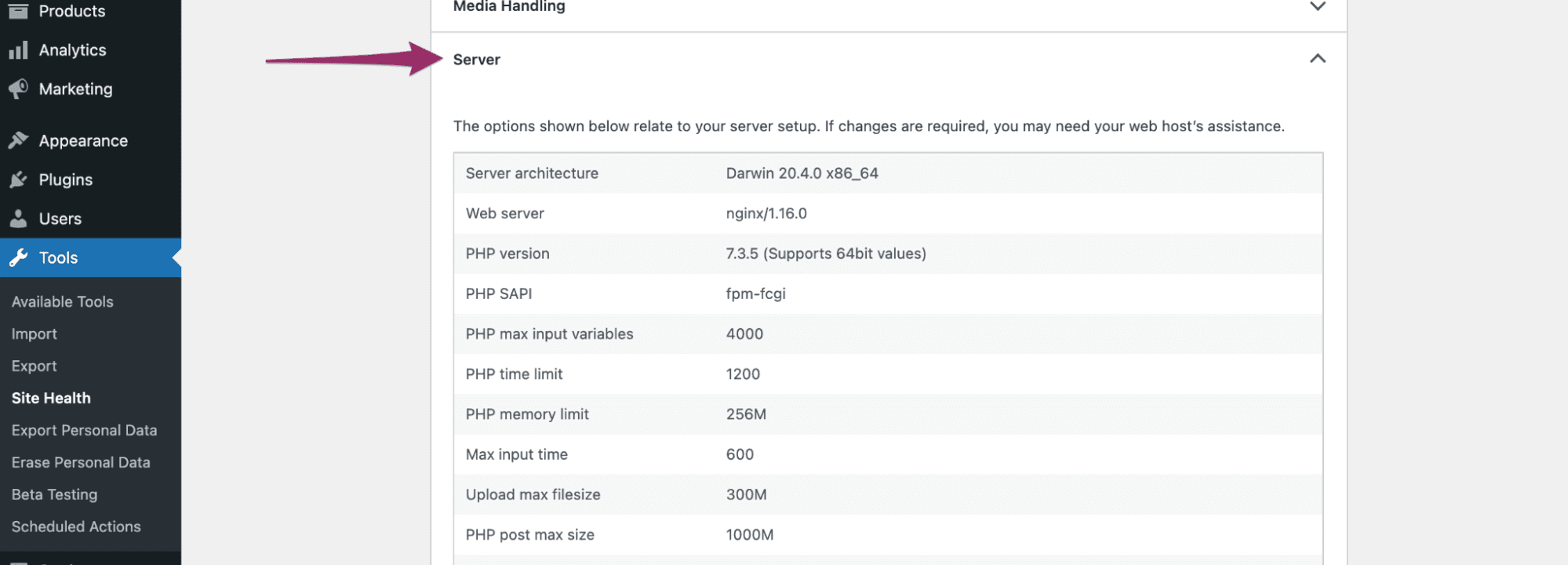
In WordPress, you can find the version in a few clicks:
- Open your WordPress dashboard;
- Go to Tools, then Site Health;
- Click the Info tab;
- Expand the Server section and read the line that gives the PHP version.
No access to the dashboard? Your hosting control panel also gives the PHP version, usually in a section of its own.
Who installs the fix, you or your host?
It depends on who manages the server your site runs on:
- On shared hosting, where you share a server with other customers (at Hostinger, Bluehost, SiteGround or IONOS, for example), your host installs new PHP versions on its machines;
- On managed WordPress hosting, where the host takes care of everything, it's also the host's job;
- On a server of your own, a VPS you rent by the month and run yourself, updating PHP is up to you.
On shared hosting, then, there's no command for you to type. Your job is to check that your host has actually applied the fix, and to ask when if it says nothing.
Two lines are enough: "Hello, my site [address] runs on PHP [version]. Has the PHP security fix of 21 October 2026 (CVE-2026-109618 and CVE-2026-109619) been applied to my server?" The two references tell support straight away what you're talking about.
At Believemy, we still had an old server running PHP 7.4, a version nobody has patched since 2022. On 21 October, rather than trying to rescue it, we simply switched it off.
What should you do if your site still runs PHP 7.4, 8.0 or 8.1?
These three versions no longer get new releases from the PHP team. It has only provided minimal fixes to compile yourself, for people who run their own server. On shared hosting, ask your host whether it has applied them. Better still, move to a maintained version.
CERT-FR, the French government's computer emergency response team, recommends isolating the affected servers, then moving to a maintained version.
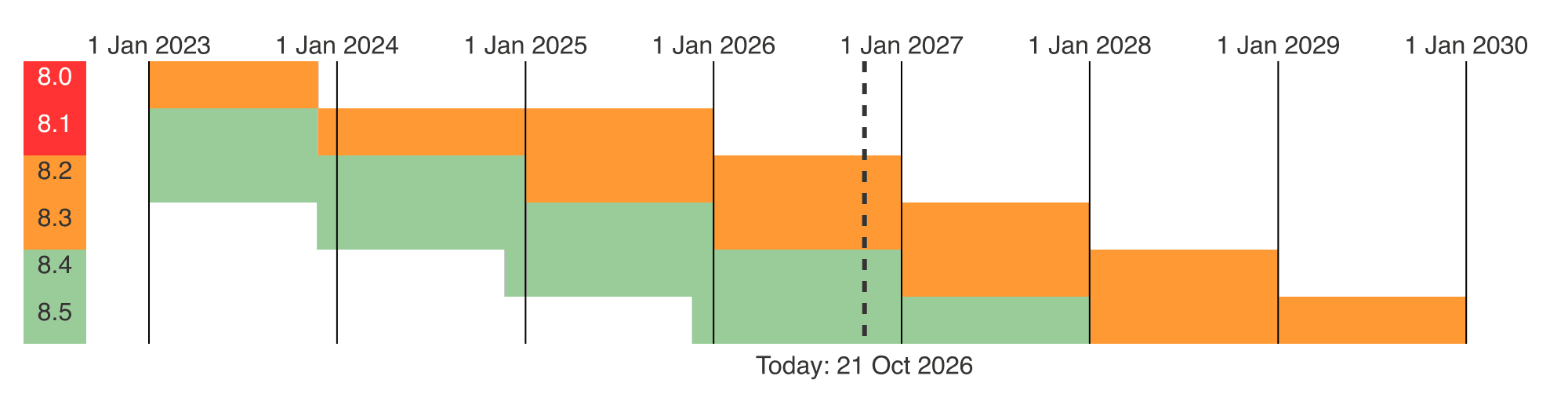
Here is how long each version gets security fixes, according to PHP's supported versions page.
| PHP version | Security fixes until |
|---|---|
| 8.5 | 31 December 2029 |
| 8.4 | 31 December 2028 |
| 8.3 | 31 December 2027 |
| 8.2 | 31 December 2026 |
| 8.1 | ended 31 December 2025 |
| 8.0 | ended 26 November 2023 |
| 7.4 | ended 28 November 2022 |
Aim for PHP 8.3 or newer. Version 8.2 stops getting fixes on 31 December 2026. Moving to it in October would mean doing it all again in January.
To switch versions without breaking your site, go in this order:
- Take a full backup, files and database;
- Update WordPress, your theme and your plugins, because an abandoned plugin may refuse to work on a recent version;
- Change the PHP version in your hosting control panel;
- Click through your site, from the home page to the contact form, with a test order if you sell online.
A page throws an error? Switch back to the old version while you replace the faulty plugin, then try again. Just don't stay for weeks on a version nobody patches any more.
How can you protect your site while you wait for the fix?
Your host may take several hours to install the new version. And a site on a version that's no longer maintained may never get one. There are two stopgaps.
Put your site behind Cloudflare, even on the free plan. According to its CTO, quoted by Sansec, Cloudflare has rolled out rules against the known attacks for all its customers.
Sansec points out that these rules only hold the line until the update, without replacing it. And switching your DNS (the address book that links your domain name to your server) can take a few hours.
Take the site offline, if you can do without it for a day: ask your host to suspend it. Several Dutch sites did exactly that on 21 October as a precaution, including the Dutch National Cyber Security Centre, according to Sansec.
CERT-FR's workarounds, for developers
If someone else manages your server, you can skip this part. It's for those who run their own machine, until they can install the new version.
CERT-FR suggests two measures, which it says it hasn't validated itself. The first one turns off an option in the php.ini file.
session.upload_progress.enabled = OffThis line disables upload progress tracking. According to CERT-FR, it only protects against one of the two flaws.
The second one blocks every request in the multipart/form-data format, the one a browser uses to send a file. With nginx, Sansec suggests this rule:
if ($http_content_type ~* "multipart/form-data") {
    return 403;
}
Any request that sends a file is then refused. The catch is that no file upload works any more, the WordPress media library included, and sometimes a shop's checkout too. Remove the rule as soon as PHP is up to date.
Above all, remember the first step. Check your PHP version in WordPress, then send two lines to your host. The rest is their job.
Frequently asked questions about the October 2026 PHP vulnerability
Does a WordPress security plugin protect against the October 2026 PHP vulnerability?
No. The two flaws are in PHP, the language WordPress runs on, not in WordPress itself. Only a new version of PHP, installed on the server, fixes them.
Cloudflare's rules or blocking file uploads limit attacks in the meantime, without replacing that update.
How can I tell whether my WordPress site uses a risky PHP version?
In WordPress, open Tools, then Site Health, the Info tab and the Server section. Versions 8.2 to 8.5 are maintained by the PHP team.
Versions 7.4, 8.0 and 8.1 no longer get fixes: move to PHP 8.3 or newer.
Is it up to me or my host to install the PHP fix?
On shared hosting or managed WordPress hosting, your host updates PHP. Ask its support whether the fix of 21 October 2026 has been applied.
On a server you run yourself, such as a VPS, installing it is up to you.
How serious is the October 2026 PHP vulnerability?
Each of the two flaws is rated 9.2 out of 10 on the CVSS scale, which puts them among critical flaws. According to Sansec, they let someone make a server run commands without having access to it.
Attack attempts were reported on 21 October 2026, before the fix was even released.