Every month, your supplier invoices sit waiting to be typed into your accounting software. You would love to hand that job to an AI. But with a top-tier model, the AI bill ends up costing more than your own hours.
GPT-6.1 Terra is OpenAI's mid-range model, announced on 26 October 2026. It can look at a screen and use it: click, type, fill in a form. At launch, it costs half as much as GPT-6.1 Sol.
Let's look at what it can do and what it really costs. Then we'll see when another model is the better pick, even if you never write a line of code.
What is GPT-6.1 Terra?
OpenAI sorts its models into four tiers, from lightest to most powerful: GPT-6 Luna, Terra, GPT-6.1 Sol and GPT-6 Astra. Terra is the middle tier, the one built for everyday work.
It replaces GPT-5.6 Terra. According to OpenAI's announcement, it beats its predecessor on what it sees, what it writes, factual errors and code.
The number in the name doesn't tell you which model is strongest. Despite its "6", GPT-6 Astra is the most powerful model in the range. Remember the order of the heavenly bodies instead, from Luna to Astra by way of Terra and Sol.
What can GPT-6.1 Terra do?
Its speciality is called computer use. The model looks at screenshots of your screen. Then it acts the way you would: it clicks, types and switches from one app to another.
OpenAI gives very concrete examples:
- Drafting a sales proposal, with more natural writing than its predecessor;
- Reading a technical drawing, for instance to build a 3D model from it;
- Filling in forms in an app or on a website;
- Editing a video in editing software;
- Copying your incoming invoices into your accounting software.
That last one is exactly the job nobody wants to do on a Sunday evening. For years I typed my invoices in by hand, promising myself I'd automate it the following month (spoiler alert, the following month never came 🥲).
Terra also makes far fewer mistakes. On trick questions designed by OpenAI, 16.7% of its answers contain an error at low reasoning effort. GPT-5.6 Terra was at 53.6%.
These questions are built to trip the model up, not to reflect your daily work. Going from 53.6% to 16.7% is 36.9 points fewer, or roughly three times fewer errors. At maximum reasoning effort, the rate drops to 4.3%.
A hallucination that slips through in a copied invoice means a wrong amount in your books. So this drop matters as much as the speed.
How much does GPT-6.1 Terra cost?
At launch, OpenAI charges $1 per million input tokens and $5 per million output tokens. A token is a chunk of a word. Input is what you send the model, output is what it writes back.
In practice? Say it drafts a reply to a client's email, which means about 2,000 tokens to read and 1,000 to write. A thousand replies cost you $7, against $14 with GPT-6.1 Sol or Claude Sonnet 5.5.
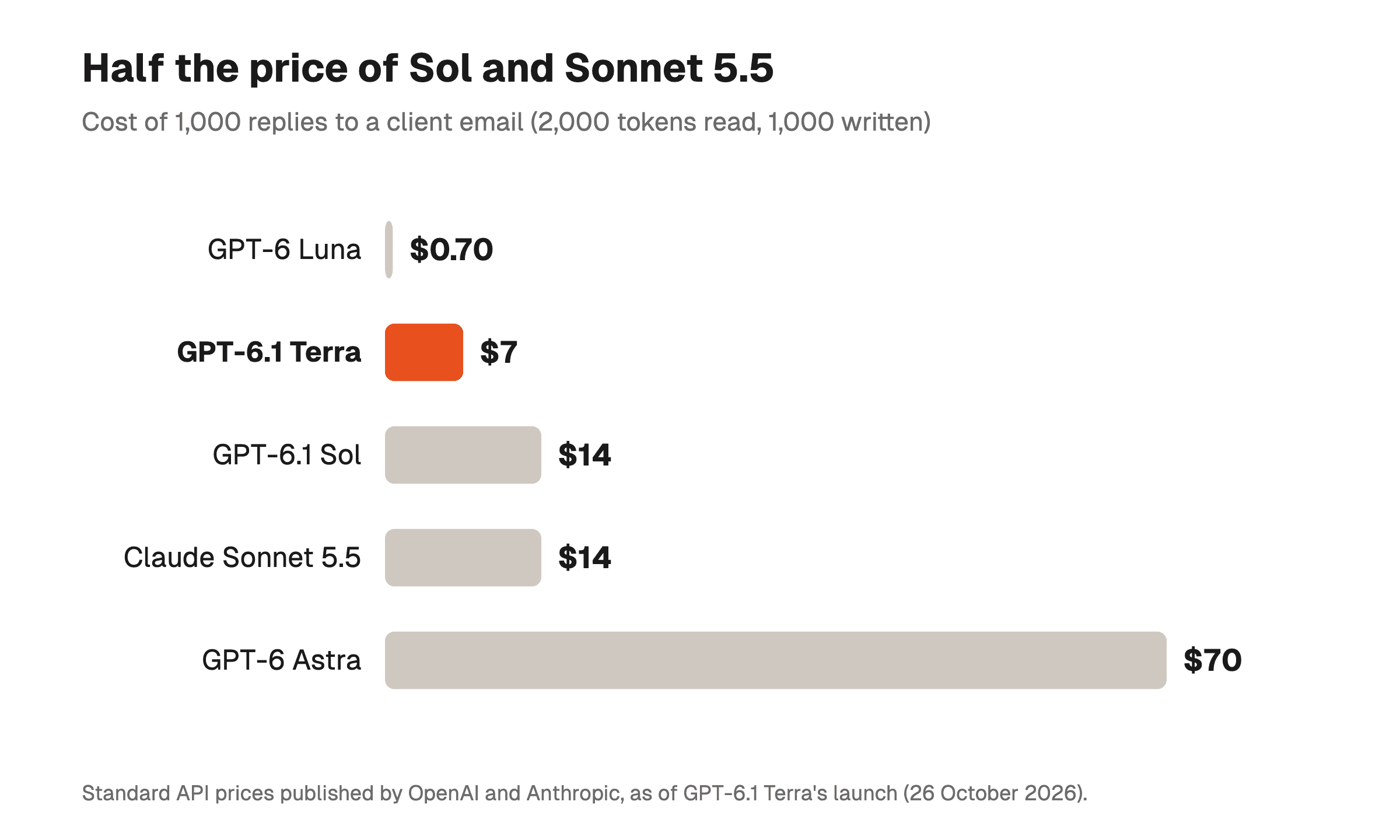
These are API prices, the access an automation uses to talk to the model. OpenAI's pricing page gives the current rate.
Text you send over and over, like your instructions or your catalogue, can be kept in memory by OpenAI. Read back from that memory, it costs only $0.05 per million tokens.
The price per token is like the price of a litre of fuel: it tells you nothing about how much the car burns. On Agents' Last Exam, OpenAI measures $1.01 per task for Terra at maximum effort. Sol spends $2.00, and Claude Opus 5.5 $8.82.
This test brings together real professional tasks. Terra completes 60.0% of them, slightly more than Sol (58.6%). Opus 5.5 does better at 63.2%, but each task costs it almost nine times as much.
How can you try GPT-6.1 Terra?
It depends on how you work:
- In ChatGPT Work, with a Plus, Pro, Enterprise or Edu plan at the time of the announcement;
- In Codex, OpenAI's coding tool, with the same plans;
- In your automations, with n8n or Make for example, by setting the model to
gpt-6.1-terraat the right step.
In ChatGPT Work and Codex, your usage allowance stays the same. Because Terra uses less, OpenAI says that allowance covers far more tasks than with Sol or Astra.
To plug Terra into a real process, like sorting your invoices, our n8n course shows how to pick a model for each step. And to hand it some code, our Codex course teaches you how to use it.
A model that clicks for you reads everything on the screen, including a page booby-trapped with a prompt injection. OpenAI says Terra resists it well. Still, give it an account that can neither pay nor delete anything.
Should you pick Terra, Sol or Claude Sonnet 5.5?
Terra is cheaper per token. But on OpenAI's own tests, it doesn't come out on top everywhere.
For driving desktop software, as measured by the OSWorld test, Claude Sonnet 5.5 completes 83.9% of tasks, against 74.2% for Terra. Each task, however, costs Sonnet $5.74, against $1.19 for Terra.
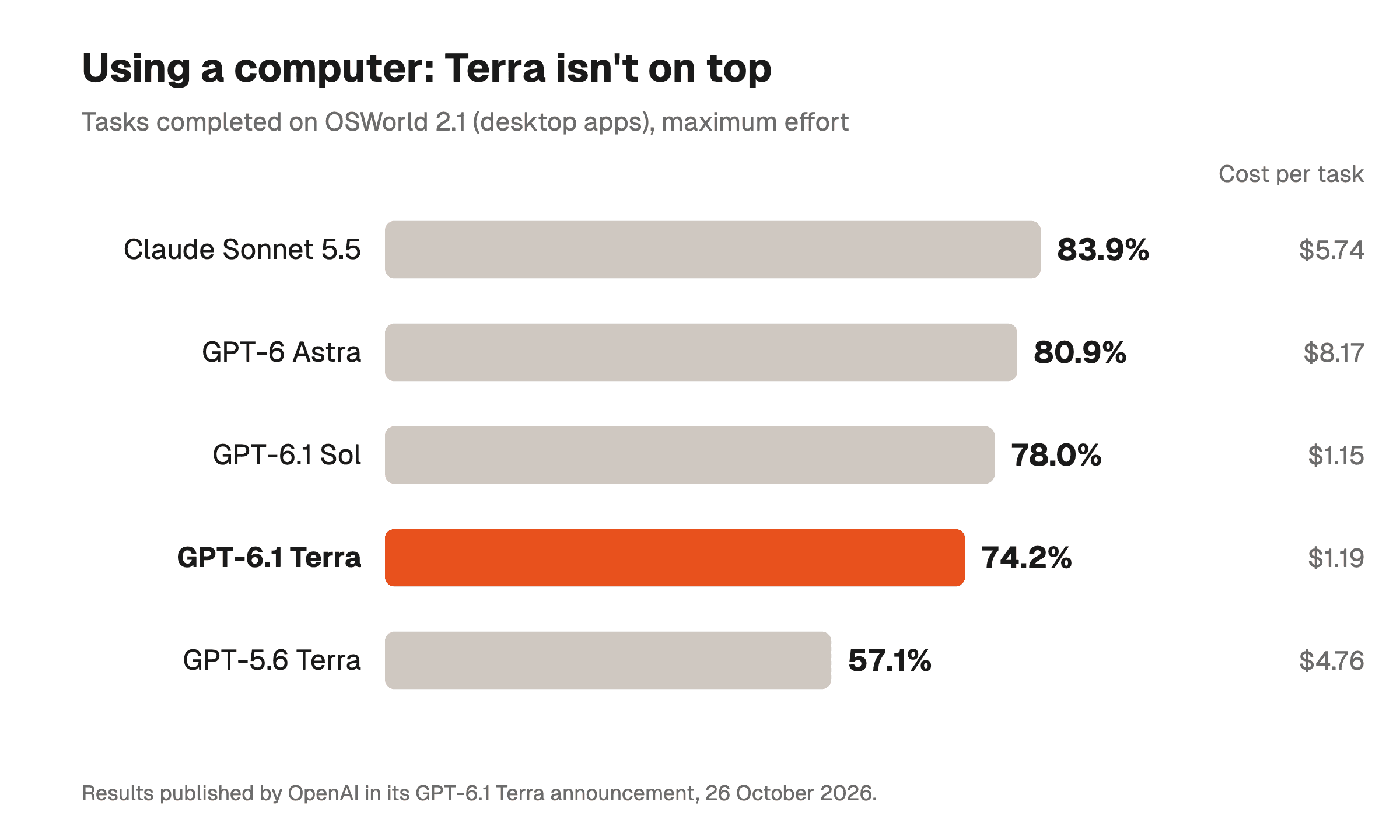
The surprise comes from Sol. On this test it completes 78.0% of tasks at $1.15 each, which is better than Terra for the same price per task. Sol burns fewer tokens, which cancels out its higher rate.
Same story for code. Terminal-Bench 4.0 measures fixing bugs from a terminal. Terra solves 50.3% of tasks, Sol 55.9% and Sonnet 5.5 70.6%. OpenAI itself recommends Sol or Astra for the hardest coding work.
Here is how to decide based on your work:
- For lots of small repetitive tasks (invoices, forms, short replies), pick Terra, because its low price counts on every call;
- For long tasks on a computer, pick Sol, or Claude Sonnet 5.5 if every failure costs you dearly;
- For code on a real project, pick Sol or Claude Sonnet 5.5, and keep Terra for small edits.
We compared those last two in detail in our GPT-6 Sol vs Claude Sonnet 5.5 comparison.
The simplest way is still to test! Take ten of your real tasks, give them to Terra and then to Sol, and count the ones you would have had to redo.
FAQ
How much does GPT-6.1 Terra cost?
At launch, GPT-6.1 Terra costs $1 per million input tokens and $5 per million output tokens in OpenAI's API. That is half the price of GPT-6.1 Sol.
For a thousand replies to a client email, expect about $7, against $14 with Sol or Claude Sonnet 5.5.
Who can use GPT-6.1 Terra in ChatGPT?
At the time of the announcement, GPT-6.1 Terra is offered in ChatGPT Work and Codex to Plus, Pro, Enterprise and Edu subscribers. Developers call it in the API as gpt-6.1-terra.
Is GPT-6.1 Terra better than GPT-6.1 Sol?
Not everywhere. In OpenAI's tests, Terra completes slightly more professional tasks than Sol (60.0% against 58.6%). Each task costs it half as much.
Sol does better at using a computer and at code. On OSWorld, it completes 78.0% of tasks against 74.2%, for almost the same cost per task.
GPT-6.1 Terra or Claude Sonnet 5.5 for using a computer?
On the OSWorld test published by OpenAI, Claude Sonnet 5.5 completes 83.9% of tasks, against 74.2% for GPT-6.1 Terra.
Terra, however, costs $1.19 per task, against $5.74 for Sonnet 5.5. The right choice depends on what a failure costs you.