Tuesday evening, you ask Claude Code to fix the VAT calculation on your website. It does, you run a quick test, you put it live. Nobody else looked at it.
The next morning, a client emails you: their invoice shows zero. When you work alone, there is no colleague to ask "did you check that case?".
Claude Ship targets that moment, between written code and live code. Launched by Anthropic on 23 November 2026, it reviews your changes, fixes what is stuck and decides what can go out, under your rules. On your own, you reach it with a single command, /ship.
Let's look at what it does and how to try it alone, even if you have never opened a pull request. You will also learn what it does on your computer in the meantime.
What is Claude Ship?
Claude Ship brings together three AI agents that take over once your code is written. They work on GitHub, around a pull request (a merge request: you propose a change, it gets reviewed, then added to the project).
Think of the proof you get from a printer. Before printing a thousand flyers, they send you a sample, you check it, you sign off. A pull request plays that role for your code.
Anthropic explains why it built it. On the team that makes Claude Code, Claude writes most of the code. Writing was fast, but review, fixes and sign-off were still waiting on people.
Two names look alike. Claude Ship is switched on for whole projects by the admin of a team on Claude Team or Claude Enterprise. /ship is a Claude Code command you run yourself, on your own change. That is the one that helps when you work alone.
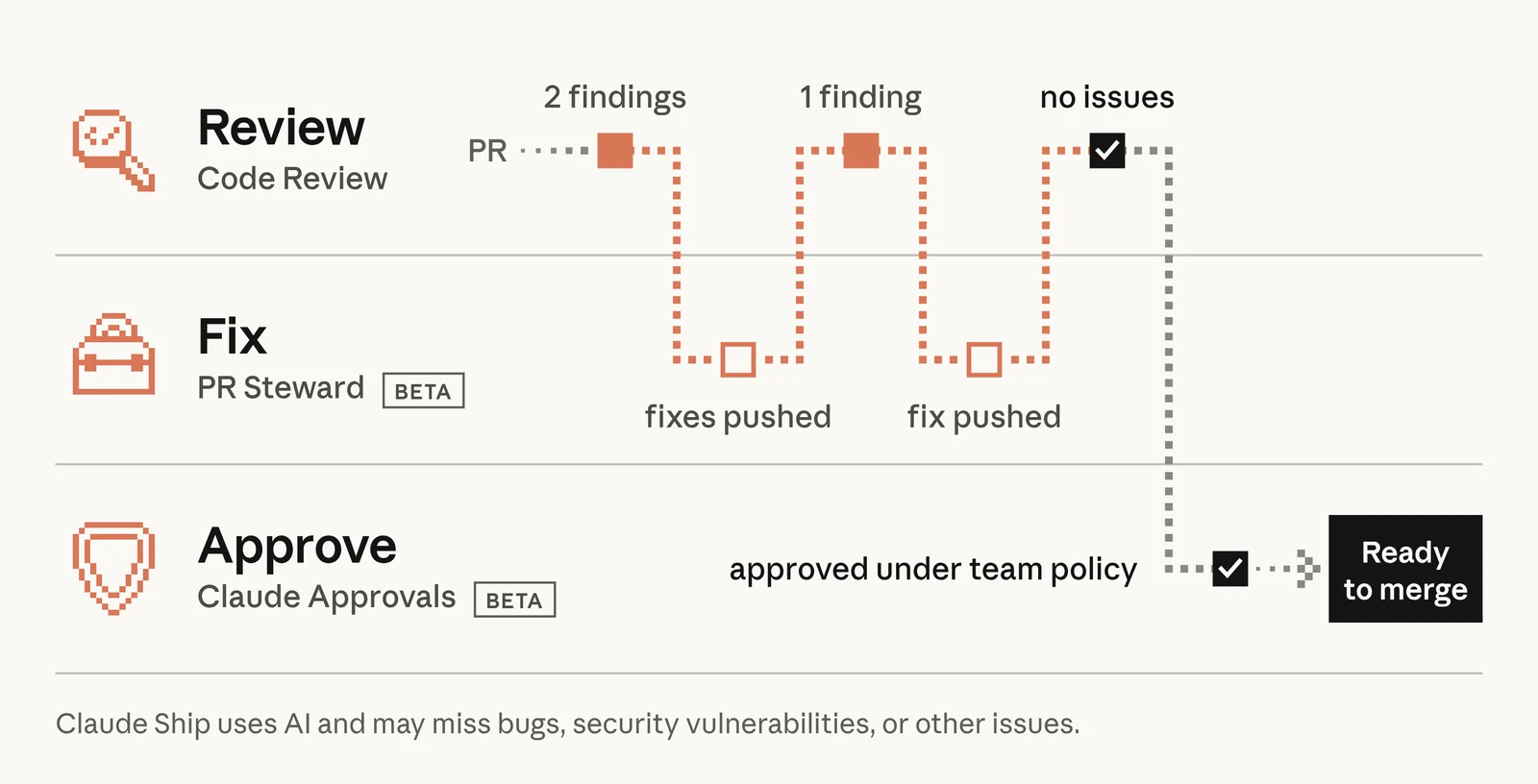
What do the three Claude Ship agents do?
Each agent handles one step. Together, they take a pull request from review to the decision to accept it.
Code Review reads your code
Code Review reads your change in the context of the rest of the project. It looks for logic errors, security holes and forgotten edge cases. Then it checks its own findings before posting them.
Its remarks arrive as comments, on the lines concerned, ranked by severity. It was the only one of the three already out of beta at launch. Each team picks a review level: quick, standard or deep.
PR Steward fixes what is blocking
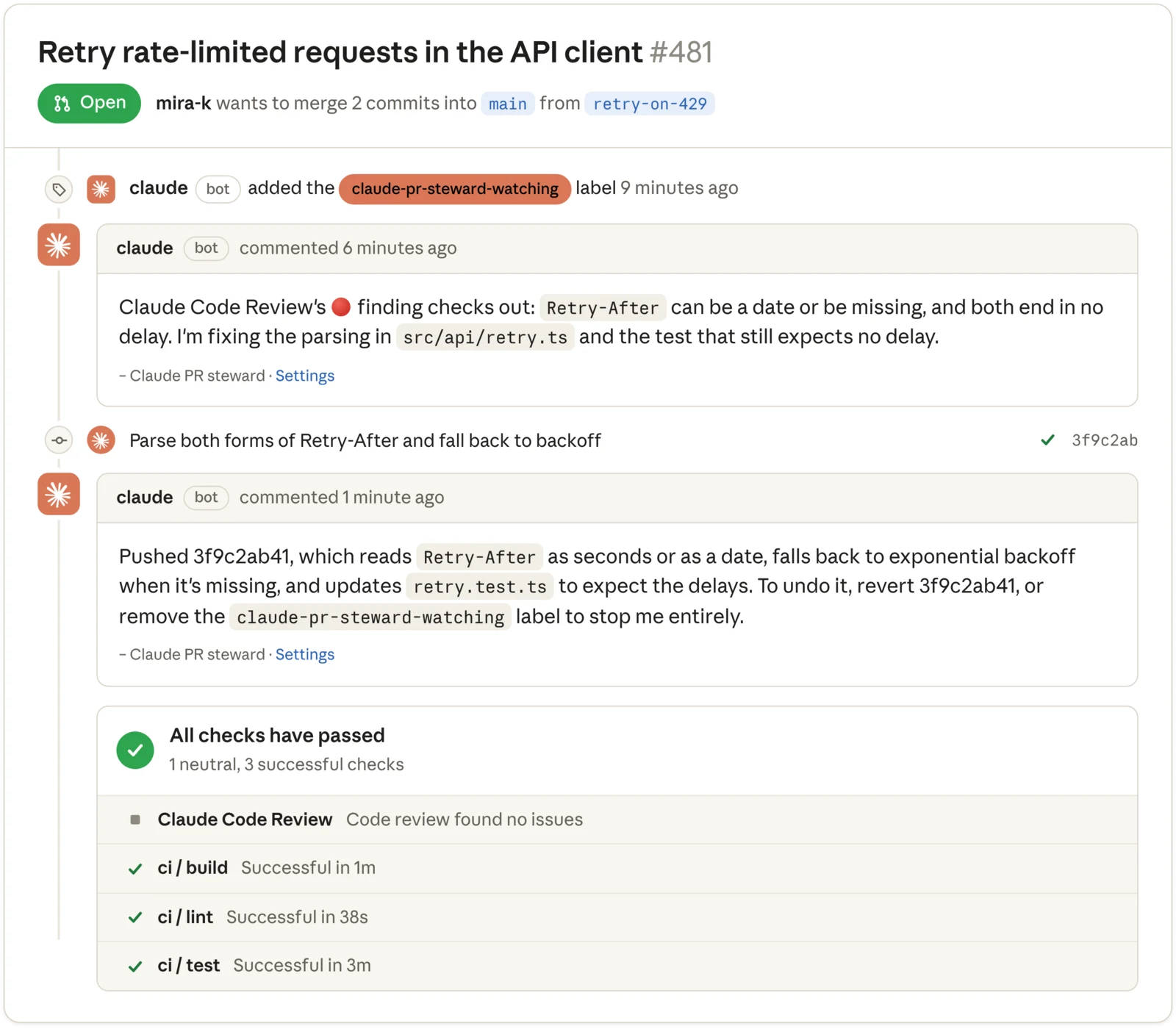
PR Steward steps in when a pull request gets stuck. An automated test fails, two changes clash, a reviewer leaves a comment? It takes care of it and pushes its fixes itself.
After each fix, it leaves a comment saying what it changed and how to undo it. You steer it by writing @claude followed by an instruction, and @claude stop makes it step back.
Anthropic designed it never to approve or merge a pull request. That is the third agent's job.
Claude Approvals decides who must sign off
Claude Approvals applies a rule the team writes in a file inside the project. It says which changes Claude can approve alone, which ones wait for a person, and how many people are needed.
In the example Anthropic published, a documentation fix goes through with Claude's approval alone. A billing change, on the other hand, needs two people, one of them from the payments team.
Anthropic recommends starting it in observe-only mode. It reports what it would have decided, without approving anything, while the team learns to trust it.
Can you use Claude Ship when you work alone?
Yes, through the /ship command in Claude Code. When your change is finished, you type /ship and Claude runs the steps:
- it pushes your work to GitHub and opens the pull request in your name;
- it reviews your change and posts its findings;
- it watches the pull request and fixes failing tests, conflicts and comments;
- it tells you when everything is ready, and you do the merge.
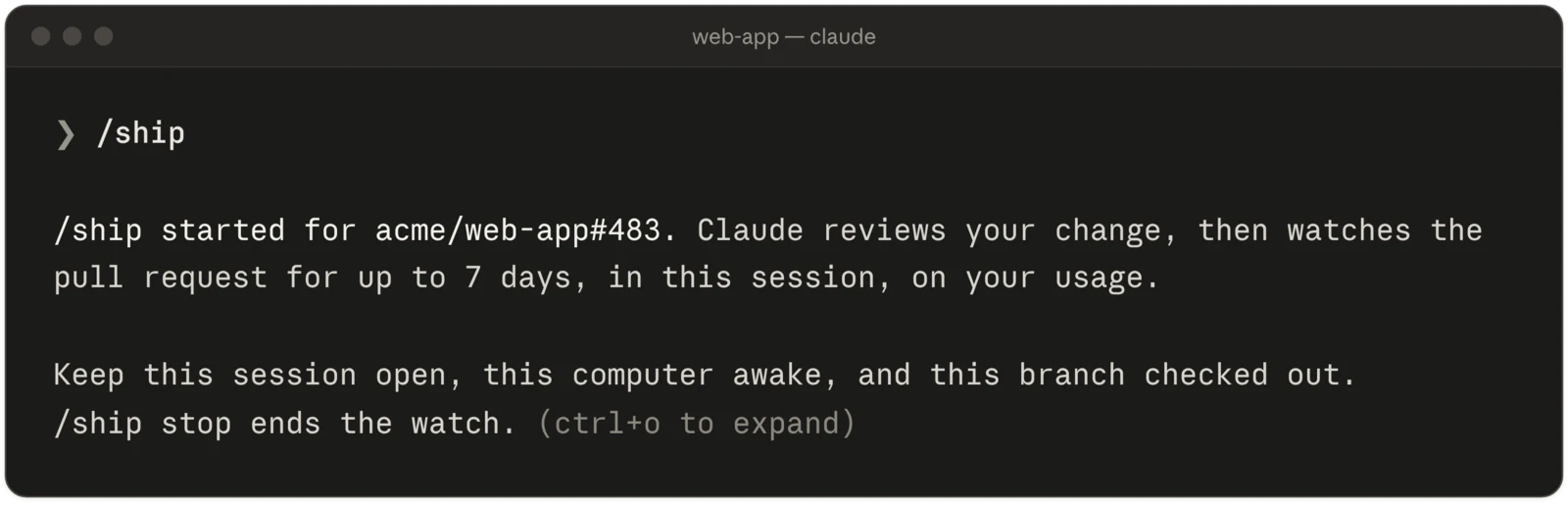
This watch can last up to seven days, in your session. If your pull request is already open and you don't want a review, /steward starts the watch straight away.
The documentation for the /ship command requires no team plan. Its work counts against your usual Claude Code usage, like any other request.
To run it, you need:
- an up-to-date Claude Code, version 2.1.330 or later;
- a project hosted on GitHub, otherwise Claude reviews your code but opens no pull request;
- the
ghtool, GitHub's official command-line program, signed in to your account; - a session on your own computer, because Claude Code cloud sessions don't have the command.
Many freelancers push their changes straight to the main branch and never open a pull request. To be honest, I often do the same on Believemy (yes, I know 🥲).
Good news: /ship copes with that. Run from the main branch, it creates a new branch and switches to it. To understand what it does to your project, the basics of Git and GitHub help a lot.
What should you watch out for before running /ship?
/ship acts fast, and in your name. After you press Enter, no window asks for confirmation. A line only appears before the commit, then before the push, with a few seconds to cancel with Esc.
Four points deserve your attention:
- it commits all your modified files, new ones included, so check the list with
git statusbefore running the command; - it only spots secrets by file name, such as
.env, and an API key pasted into another file would go up with the rest; - the watch runs on your computer, so keep the session open, the machine awake and the same branch checked out, or it stops;
- Claude needs auto mode to move forward without you, because in other modes it waits for your approval at each step.
During the watch, Claude Code blocks commands that merge or approve the pull request. Anthropic warns, though, that this block doesn't cover everything. If your project lets you merge without review, Claude could too, with your access.
The watch uses your GitHub credentials. Anyone who can push code to your branch, or merge into the main branch, can therefore run programs on your computer. Only run /ship on a project where you trust everyone who has access.
One last detail for those working on Windows without the Linux subsystem: the review works, but the watch doesn't start.
How much does Claude Ship cost for a team?
For a team, Claude Ship is pay as you go. Every review and every fix uses tokens, billed on top of the Team or Enterprise subscription.
The bill depends on the number and size of pull requests, the review level and how often reviews run. By default, a review runs after every push, which multiplies the cost by the number of pushes. The admin can set a monthly cap for Code Review and PR Steward.
Anthropic's announcement adds two more points:
- eligible Enterprise organisations could claim at least $10,000 in Claude Ship credits until 15 January 2027;
- Claude Ship is not offered to organisations with Zero Data Retention, the HIPAA configuration for US health data, or their own encryption keys.
If you are still choosing between Claude subscriptions, our article on the differences between Pro, Max and Team covers what each one includes.
Is Claude Ship worth it when you build alone?
Anthropic shares a result measured on its own team. From June to September, the number of merged pull requests more than doubled, and the share of changes reverted afterwards fell by more than 40%.
These figures come from Anthropic, on its own projects, with no starting value. We don't know whether the team merged 50 or 5,000 pull requests in June. The 40% drop applies to a share. If 10% of changes used to be reverted, that would fall to around 6%, not to zero.
Anthropic adds that Claude's review was only one step among others in its process. Hard, then, to give it all the credit.
Depending on your situation, here is what we recommend:
- you code alone with Claude Code, on GitHub? Try
/shipon your next change, it is the simplest way to get a second pair of eyes; - you mostly build with no-code tools? Skip it, Claude Ship only covers code hosted on GitHub;
- several of you work on the same project? The full Claude Ship makes sense, provided you are on Team or Enterprise;
- you already use a review tool, such as GitHub's Copilot, CodeRabbit or Cursor's Bugbot? Claude Ship can read their comments, nothing forces you to replace everything.
One thing doesn't change: Claude reviews, but you decide. Anthropic itself writes that Claude Ship may miss bugs or security holes.
Judging a comment, or spotting the one that is missing, is something you learn. That is the whole point of understanding the code AI writes for you, rather than approving it with your eyes closed.
To get started, there is nothing to configure. Update Claude Code, finish your next change and type /ship. You will soon see what Claude has to say about it 😉
Frequently asked questions about Claude Ship
Is Claude Ship free?
No. At its launch in November 2026, Claude Ship was reserved for Claude Team and Enterprise plans, and billed on token usage, on top of the subscription.
The /ship command in Claude Code counts against your usual Claude Code usage, with no announced extra charge.
Can you use /ship without GitHub?
Partly. On a project hosted somewhere other than GitHub, Claude reviews your change but opens no pull request. The watch and automatic fixes need a project on GitHub.
Can Claude Ship put my code live on its own?
Not with /ship. Claude prepares the pull request, and you are the one who merges it. Anthropic warns, however, that a project which lets you merge without review also lets Claude do it, with your access.
In a team, PR Steward can neither approve nor merge. Claude Approvals can approve routine changes on its own, if the rule written by the team allows it.
What is the difference between Claude Ship and Claude Code?
Claude Code helps you write code. Claude Ship steps in afterwards, once the pull request is open. It reviews, fixes and applies the team's sign-off rules.
According to Anthropic, a team can use Claude Ship without using Claude Code. The /ship command, however, runs from Claude Code.